
Do you want to discover the best WordPress CRM plugins and integrations that can help you manage customers and improve your marketing?
As your business grows, keeping track of leads, customers, and marketing data becomes increasingly challenging. Without a proper CRM, valuable information can end up scattered across contact forms, email platforms, membership plugins, and ecommerce systems, making it difficult to build lasting customer relationships.
The good news is that you don’t need to leave WordPress to create an effective CRM workflow. With the right plugins and integrations, you can connect your website to your preferred CRM, automate data syncing, and run more effective marketing campaigns with less manual work.
In this guide, I will walk you through the best WordPress CRM plugins that actually make sense for marketers. I’ll also show you how to use FuseWP to connect your WordPress site to multiple CRMs and automatically sync data from many of your favorite WordPress plugins.
What Is a WordPress CRM?
A WordPress CRM is a customer relationship management system that connects with your WordPress website. It helps you collect, organize, and manage details about your leads, customers, subscribers, and website visitors from a central place.
Instead of keeping customer information scattered across form entries, email inboxes, spreadsheets, and notes, a WordPress CRM brings everything together. You can see who contacted your business, what they were interested in, when they reached out, and what action should happen next.
For marketers, this is very important. A visitor may fill out a contact form, download a lead magnet, subscribe to your newsletter, request a quote, or buy a product. Without a CRM, that activity may only appear as a basic notification. With a CRM, you can create a contact profile, add the person to a list, trigger follow-up emails, and track their journey from visitor to customer.
A WordPress CRM can work in two ways. Some CRMs are plugins installed directly inside your WordPress dashboard. Others are external platforms that connect to your site through integrations. Both options help you manage customer data, follow up with leads, and improve your marketing process.
Benefits of Using a CRM on Your WordPress Website
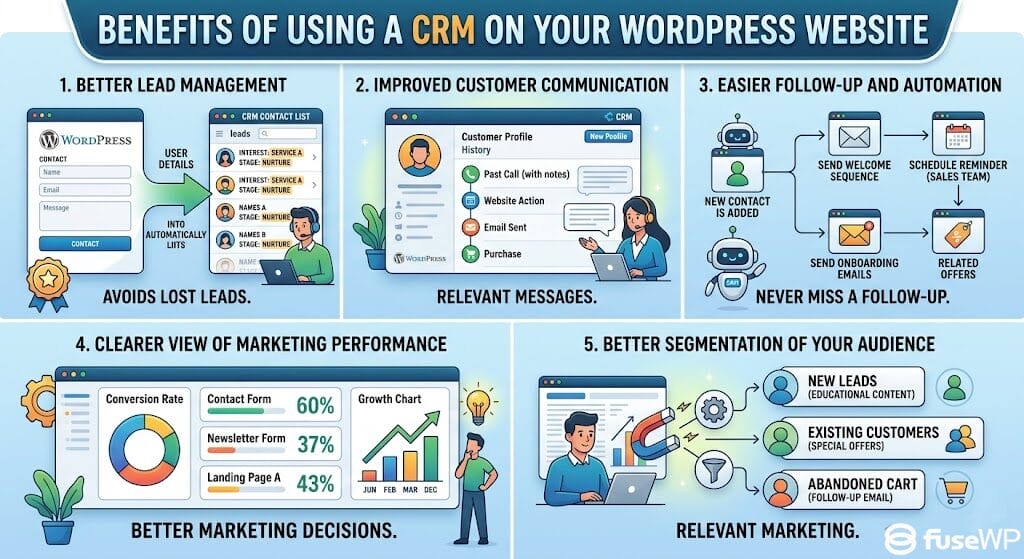
1. Better Lead Management: A WordPress CRM makes it easier to manage leads from the moment they interact with your website. When someone fills out a contact form, downloads a resource, books a call, or subscribes to your email list, their details can be automatically saved in your CRM.
This helps you avoid losing valuable leads in your inbox or forgetting to follow up. You can tag contacts by interest, group them by service needs, assign them to different stages, and see which leads are ready for the next conversation.
2. Improved Customer Communication: Good marketing depends on timely and relevant communication. A CRM helps you keep track of past conversations, website actions, email activity, purchases, and support requests. This means you do not have to start from scratch every time you speak with a lead or customer.
For example, if a customer contacted you about a service last month and later returns to your website, your CRM can help you see their history. You can respond with better context, recommend the right offer, and avoid sending messages that feel random or disconnected.
3. Easier Follow-Up and Automation: Many businesses lose sales because they do not follow up at the right time. A WordPress CRM can help solve this by allowing you to create automated follow-up actions.
4. Clear View of Marketing Performance: A CRM can show you where your leads are coming from and how they move through your sales process. You may discover that your contact form generates more serious leads than your newsletter form, or that a specific landing page attracts people more likely to buy.
5. Better Segmentation of Your Audience: Not every visitor on your website wants the same thing. Some may be new visitors who are still learning about your brand. Others may be ready to buy. Some may be interested in a specific service, product, course, or offer. A CRM helps you segment your audience by behavior, interests, purchase history, location, or stage in the customer journey. This makes your marketing more relevant.
Now that you have a better understanding of what a WordPress CRM is and the benefits of using one, let’s look at the best WordPress CRM plugins.
1. HubSpot
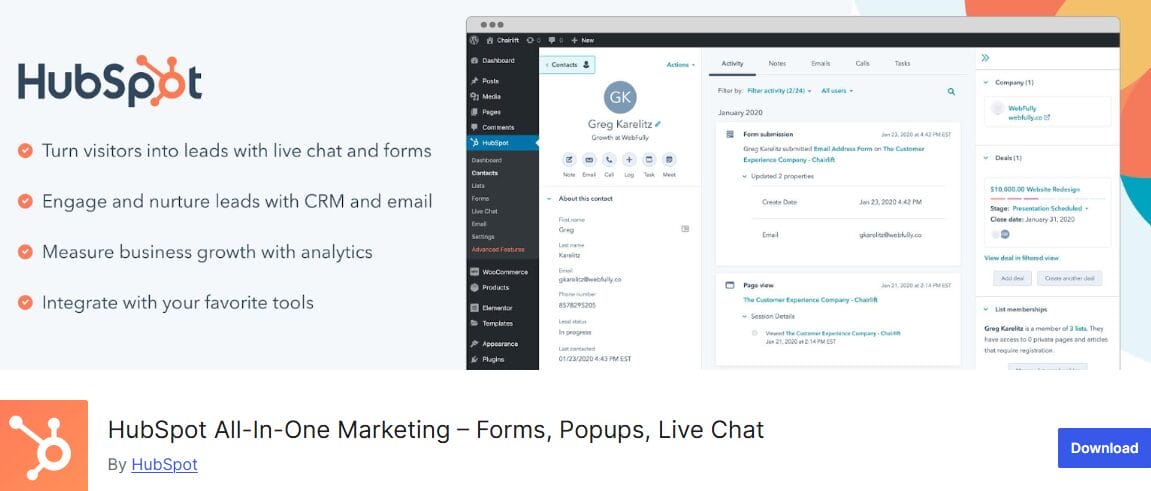
HubSpot is an excellent all-in-one CRM platform that combines customer relationship management, email marketing, lead generation, live chat, forms, analytics, and sales automation in a single ecosystem. If you’re looking for a solution that goes beyond contact management and helps you run your marketing operations from a single dashboard, HubSpot is worth considering.
Its official WordPress plugin makes it easy to connect your website to your HubSpot account without complicated setup. Once connected, you can automatically capture leads from your forms, track visitor activity, manage contacts inside the built-in CRM, and launch email campaigns based on user behavior. This makes it a practical choice for businesses that want to turn website visitors into paying customers.
Another reason marketers choose HubSpot is its large ecosystem of integrations with many popular WordPress plugins and third-party services, allowing you to sync customer data across your website, email marketing platform, and sales pipeline.
Features of HubSpot
- Contact management for storing and organizing leads, customers, and subscribers.
- WordPress forms and popups to capture leads on your website.
- Live chat and chatbots for engaging visitors in real time.
- Email marketing for sending newsletters, promotions, and follow-up campaigns.
- Marketing automation for sending emails after form submissions or chat interactions.
- Contact activity timeline showing page views, form submissions, emails, and conversations.
- Pipeline management for tracking deals and sales opportunities.
- Analytics dashboard for monitoring forms, emails, chats, traffic, and sales activity.
- Integration with popular WordPress form builders, ecommerce platforms, and marketing apps.
- Mobile access to reply to conversations and manage contacts on the go.
Pros
- Combines CRM, email marketing, forms, live chat, and analytics in a single platform.
- The free WordPress plugin gives marketers a lot to start with.
- Useful for tracking the full journey of a lead from website visit to follow-up.
- Works well for businesses that need marketing, sales, and support data in the same place.
- The contact timeline makes it easier to understand each lead’s behavior.
- Good option for teams because everyone can see the same customer information.
- Connects with many WordPress plugins and third-party platforms.
- Offers room to grow as your business needs evolve.
Cons
- It may feel like too much if you only need a basic WordPress contact management plugin.
- Most advanced automation and reporting features are not available on the free plan.
- New users may need time to understand the dashboard and settings.
Pricing
HubSpot has a free WordPress plugin, which makes it a good starting point for marketers who want to test it without paying up front.
Paid pricing depends on the HubSpot product you choose, such as Marketing Hub, Sales Hub, Service Hub, or the Starter Customer Platform.
2. Mailchimp

If your primary goal is to grow and engage your email list, Mailchimp is a great WordPress CRM option to consider. While it is not a traditional sales CRM, it does a good job of helping marketers organize contacts, segment audiences, and create targeted email campaigns that improve engagement and conversions.
Mailchimp’s biggest strength is audience management. You can organize subscribers using tags, segments, and groups, making it easier to send relevant emails rather than the same message to everyone. With its automation features, you can also create welcome sequences, abandoned cart reminders, follow-up emails, and other campaigns that run automatically.
Mailchimp also connects well with WordPress through different plugins and integrations. If you want deeper synchronization between your website and Mailchimp, FuseWP can help by automatically syncing WordPress users, customers, and members from ecommerce, LMS, form, and membership plugins to your Mailchimp audience.
Features of Mailchimp
- Email marketing campaigns for newsletters, promotions, product updates, and lead nurturing.
- Signup forms you can add to your WordPress pages, blog posts, sidebars, and popups.
- Audience segmentation to group contacts by interests, behavior, tags, or sign-up source.
- Customer journey automation for welcome emails, follow-ups, abandoned cart messages, and re-engagement campaigns.
- Landing pages for collecting leads without needing a separate page builder.
- Email templates and drag-and-drop editing for creating campaigns faster.
- Contact profiles that show subscriber details, activity, tags, and engagement history.
- WooCommerce integration for ecommerce tracking, product recommendations, and abandoned cart emails.
- Campaign reports that show open rates, clicks, unsubscribes, and overall email performance.
- A/B testing to compare subject lines, content, and campaign performance.
Pros
- Easy to connect with WordPress through plugins, forms, WooCommerce, and other marketing integrations.
- Great for building an email list and nurturing leads from your website.
- The email builder is simple to use, even if you do not have design experience.
- Good automation options for welcome sequences, follow-up emails, and customer re-engagement.
- Works well for bloggers, marketers, ecommerce stores, and small businesses.
- Offers useful reporting, so you can see how your campaigns are performing.
- Has a free plan, which makes it easier to test before upgrading.
- Supports tags and segments, making it easier to send more relevant emails.
Cons
- It is not a full sales CRM, so it may feel limited if you need advanced deal tracking or pipeline management.
- Pricing can increase quickly as your contact list grows.
- Managing multiple audiences can be confusing if your contact list is not properly organized.
Pricing
Mailchimp offers a free plan for smaller lists, which is useful if you are just starting. Paid plans include Essentials, Standard, and Premium. Essentials starts at $6.50 per month.
3. FluentCRM

FluentCRM is an excellent option if you want to manage your CRM and email marketing directly inside WordPress. Unlike platforms such as Mailchimp and HubSpot, FluentCRM is self-hosted, meaning your contact data, email campaigns, automations, and reports remain on your WordPress website.
For marketers who prefer working from the WordPress dashboard, this approach feels more natural and gives them greater control over their data.
With FluentCRM, you can collect leads, organize contacts with lists and tags, send newsletters, build automation funnels, and track email performance. It also integrates with WooCommerce, LMS plugins, membership plugins, form plugins, and many other WordPress extensions, making it a good fit for online stores, course creators, bloggers, membership sites, and agencies.
The main thing to keep in mind is that FluentCRM is not a cloud-based CRM that manages the technical infrastructure for you. Because it runs on your own website, your hosting environment, email delivery setup, and overall site performance play an important role in how well it operates.
Features of FluentCRM
- Contact management inside your WordPress dashboard.
- Unlimited contacts and email campaigns.
- Email campaign builder for newsletters, promotions, and follow-up emails.
- Email automation funnels based on user actions.
- Lists and tags for organizing leads and customers.
- Contact profiles with activity history, notes, calls, and meeting logs.
- Email reports showing opens, clicks, link activity, and campaign performance.
- Integrated opt-in forms for collecting leads.
- WooCommerce support for customer segmentation and purchase-based emails.
- LMS and membership plugin integrations for course and subscription websites.
- CSV, WordPress user, and WooCommerce customer import.
- GDPR-friendly setup because data stays on your own WordPress site.
Pros
- Works directly inside WordPress, so you do not need to manage contacts from a separate dashboard.
- Good choice for marketers who want CRM, email campaigns, and automation all in one place.
- Self-hosted setup gives you more control over your customer data.
- Useful integrations with WooCommerce, Fluent Forms, LearnDash, LifterLMS, MemberPress, AffiliateWP, and more.
- Good for ecommerce, courses, memberships, newsletters, and lead nurturing.
- Built-in reports help you understand how your emails and funnels are performing.
- The free version gives you enough to start collecting leads and sending campaigns.
Cons
- It only works on WordPress, so it is not ideal if you manage leads across several non-WordPress platforms.
- You need an SMTP service, such as Amazon SES, Mailgun, SendGrid, or another email delivery provider, to send emails more reliably.
- Since it is self-hosted, your hosting quality can affect performance.
- Some advanced automation, segmentation, and integration features require the Pro version.
- New users may need time to understand automations, tags, lists, and email delivery settings.
Pricing
FluentCRM has a free version that you can install from the WordPress plugin directory. For advanced features, FluentCRM Pro is available on yearly plans starting at $103 per year.
4. Brevo
Brevo is an effective marketing platform that combines email, SMS, WhatsApp, push notifications, live chat, and CRM functionality in a single platform. It started as an email marketing service, but over the years, it has evolved into a CRM that supports both sales and marketing activities.
For WordPress users, Brevo offers an official plugin that lets you capture leads, manage contacts, and create automation workflows without leaving your website. The plugin also integrates well with WooCommerce and other popular WordPress solutions, making it easier to connect your site with your marketing efforts.
What we like about Brevo is its approach to multi-channel marketing. You can build campaigns that combine email, SMS, WhatsApp, and push notifications, and segment your audience by behavior, demographics, or purchase history.
For example, if someone abandons their cart in your WooCommerce store, you can automatically send a reminder email. If they still don’t complete the purchase, you can follow up with an SMS or WhatsApp message a few hours later. Workflows like this were once limited to expensive enterprise platforms, but Brevo makes them available to businesses with much smaller budgets.
If you need deeper integration with WordPress, FuseWP can sync users, members, and customers from eCommerce, LMS, form, and membership plugins directly to Brevo, making it easier to keep your contact data up to date.
Features of Brevo
- Email campaigns with drag-and-drop editor, templates, and A/B testing.
- SMS and WhatsApp campaigns.
- Push notifications for website visitors.
- Contact management with lists, tags, and segmentation.
- Multi-channel marketing automation workflows.
- WooCommerce integration for abandoned cart recovery and purchase-based campaigns.
- Forms and popups with double opt-in for GDPR compliance.
- Live chat for real-time visitor engagement.
- Transactional email via Brevo SMTP with delivery tracking.
- Ads audience sync with Facebook and Google Ads.
- Migration from other email platforms like Mailchimp, Omnisend, and Klaviyo.
- Reporting and analytics across campaigns and customer activity.
Pros
- Handles multiple channels (email, SMS, WhatsApp, push) in one platform.
- Free plan supports unlimited contacts and up to 9,000 emails per month.
- Effective automation features for welcome sequences, abandoned carts, and post-purchase follow-ups.
- Official WordPress plugin for easy lead collection and contact management.
- WooCommerce integration enables targeted marketing based on purchase behavior.
- GDPR-compliant with double opt-in and consent management.
- Visual workflow builder for automation without coding.
Cons
- Sales CRM features are basic compared with platforms like HubSpot.
- Paid plans are based on email volume, which can get expensive if you send a lot of messages.
- Some advanced reporting and automation features require higher-tier plans.
- Multi-channel workflows can be complex for beginners to set up initially.
Pricing
Brevo offers a free plan that supports unlimited contacts and up to 9,000 emails per month. Paid plans start at $9 per month.
5. Jetpack CRM
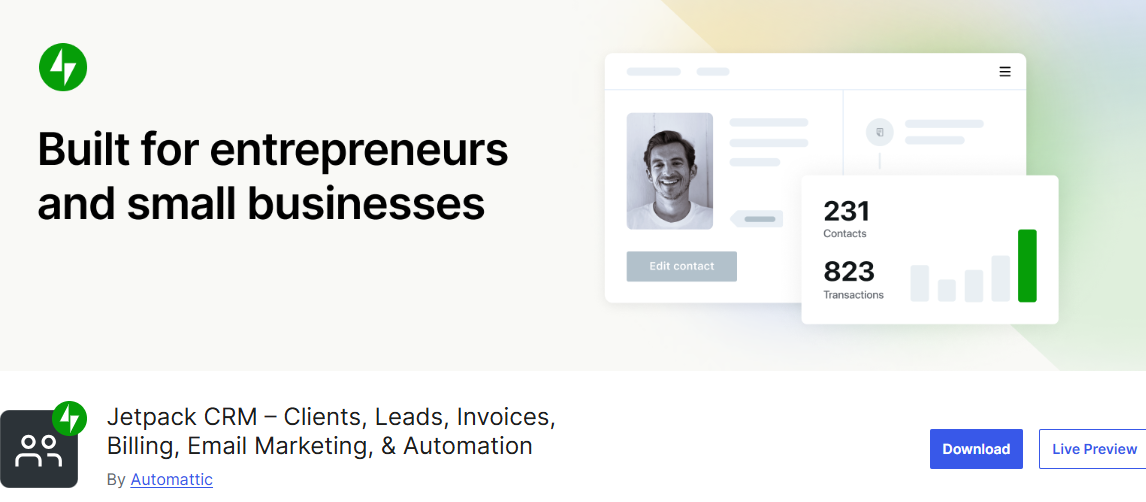
Jetpack CRM is a good fit if you want a WordPress CRM that focuses on contact management, lead tracking, quotes, invoices, payments, and client relationships. It is designed for small businesses, freelancers, agencies, WooCommerce stores, and service-based websites that want to manage customers without leaving WordPress.
Rather than trying to be an overly complex sales platform, it provides the features many businesses actually need. You can add contacts, track activity, send quotes, create invoices, record transactions, manage tasks, and give clients access to a portal where they can view files, invoices, and proposals. This makes it particularly useful for businesses that work directly with clients and need more than email marketing capabilities.
Jetpack CRM also integrates well with WooCommerce and WordPress form plugins. You can use it to sync customer information, track payments, manage proposals, and maintain detailed records for each contact. While it may not be the best choice if your primary focus is advanced email automation, it is an excellent option for managing client records, billing, quotes, and sales follow-up directly inside WordPress.
Features of Jetpack CRM
- Contact and lead management.
- Quote and invoice creation.
- Client portal for sharing invoices, files, and proposals.
- Transaction and payment tracking.
- Front-end lead capture forms.
- WooCommerce customer and order synchronization.
- Task scheduling and activity logging.
- Contact tagging and dynamic segmentation.
- Custom fields for storing additional customer information.
- Optional extensions for email campaigns, automations, SMS, and payment integrations.
Pros
- Self-hosted CRM that keeps your data on your own WordPress website.
- Includes invoicing and quoting features without requiring extra software.
- Works well for freelancers, agencies, and small businesses.
- WooCommerce integration makes customer management easier for online stores.
Cons
- Many advanced capabilities require paid extensions.
- Initial setup can take time if you plan to use multiple extensions.
- Marketing automation features are not as advanced as dedicated marketing platforms.
Pricing
Jetpack CRM offers a free version with core CRM functionality. Premium extensions and bundled plans start at $11 per month.
6. ProfilePress
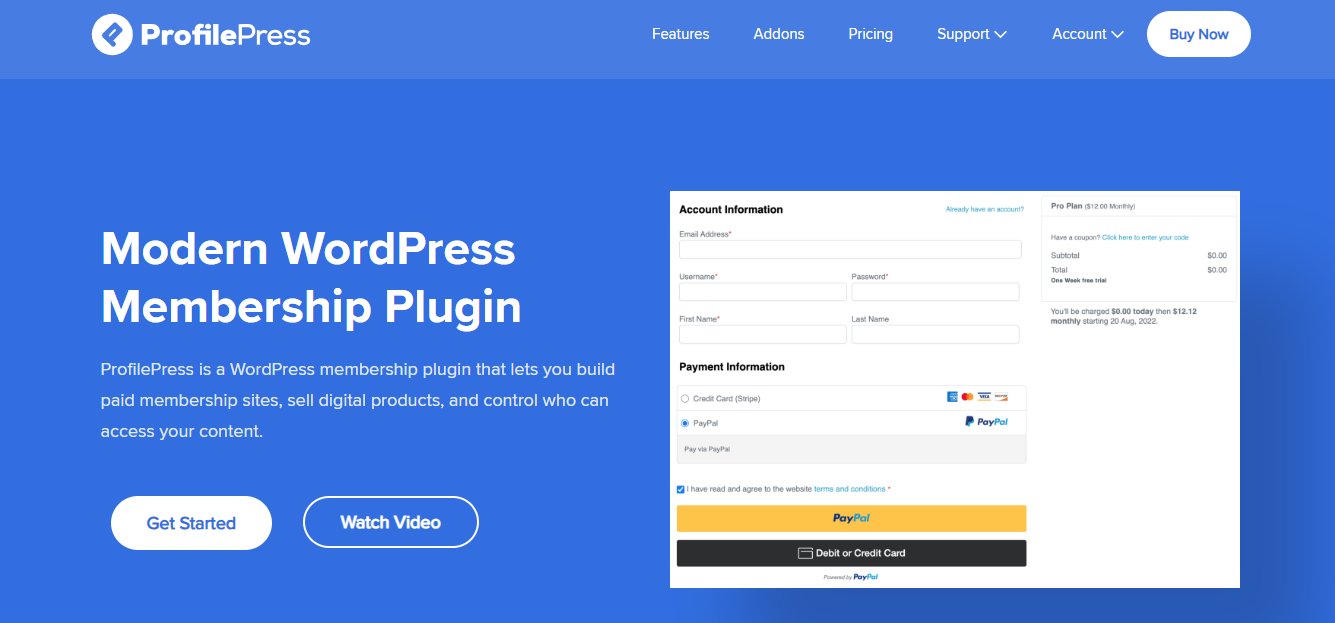
At first glance, ProfilePress might seem like an unusual addition to a list of WordPress CRM plugins. After all, it isn’t built around sales pipelines or deal management. Instead, its focus is on memberships, subscriptions, digital products, and user management.
So why include it here?
The answer is its CRM integration capabilities. ProfilePress can automatically subscribe users to your CRM when they register, purchase a product, or join a membership plan. It also keeps customer information up to date by syncing profile changes with supported platforms such as Mailchimp, Campaign Monitor, MailerLite, and Brevo. If you run a membership site or subscription business, that kind of automation can save a lot of manual work.
Beyond CRM syncing, ProfilePress is packed with features for monetizing a WordPress website. You can accept recurring payments, create paywalls, build custom registration and checkout forms, manage member accounts, and even sell access to online courses through integrations with popular LMS plugins. If your marketing strategy revolves around paid memberships, it does a great job of connecting customer management with revenue generation.
Features of ProfilePress
- CRM and email marketing integrations with Mailchimp, Campaign Monitor, MailerLite, and Brevo
- Accept one-time and recurring payments
- Sell memberships, subscriptions, and digital downloads
- Content restriction and paywall functionality
- Custom registration, login, password reset, and checkout forms
- Drag and drop form builder
- Member dashboards and profile management
- Ecommerce and membership reporting
- LMS integrations with LearnDash, LifterLMS, Tutor LMS, Academy LMS, and others
- WooCommerce membership support
- Social login and two-factor authentication
- Email confirmation and user moderation
- EU VAT and tax collection
- Spam protection with reCAPTCHA, Cloudflare Turnstile, and Akismet
Pros
- Connects membership management with CRM and email marketing platforms
- Supports many payment gateways
- Flexible content restriction options
- Great choice for subscription businesses and online course creators
Cons
- Not designed for sales pipeline or deal management
- CRM and email marketing integrations are only available on paid plans
Pricing
ProfilePress has a free version with basic membership functionality. Paid plans unlock CRM integrations, additional payment gateways, advanced content restriction options, and reporting features. Pricing starts at $129 per year.
7. MailOptin
MailOptin is best known as a lead generation and email marketing plugin, but it also plays an important role in helping WordPress websites work alongside CRM platforms.
If your goal is to collect more leads, grow your email list, and automatically send customer data to your preferred CRM or email service, MailOptin deserves a place on your plugin list.
What immediately caught our attention is the number of ways it helps you capture subscribers. You can create popups, notification bars, slide-ins, sidebar forms, embedded optin forms, and call-to-action campaigns without touching code. It also integrates with popular form plugins, making it easy to connect existing forms to your email marketing platform.
Beyond collecting leads, it can automatically email your subscribers new posts and articles, scheduled newsletters, and email digests, while syncing contacts with services like Mailchimp, Brevo, ActiveCampaign, HubSpot, Salesforce, Klaviyo, and many others.
If your CRM strategy revolves around email marketing and lead nurturing rather than sales pipelines, MailOptin can become a valuable addition to your WordPress website.
Features of MailOptin
- Integration with major CRMs and email marketing platforms (Constant Contact, Campaign Monitor, MailerLite, Salesforce, ActiveCampaign, EmailOctopus, and more).
- User registration forms and lead syncing for WooCommerce and LMS plugins.
- A/B testing for opt-in campaigns.
- Advanced targeting by pages, traffic source, device type, or visitor behavior.
- Spam protection with Honeypot, reCAPTCHA, and Cloudflare Turnstile.
- Email digests for daily, weekly, or monthly content updates.
- Lead storage in MailOptin with conversion source tracking.
- Drag-and-drop form and newsletter builder.
- Popups, slide-ins, notification bars, and inline forms.
- Automated newsletters and new post notifications.
Pros
- Automates subscriber syncing with CRMs and email marketing platforms.
- Combines lead capture, popups, and newsletters into a single plugin.
- Multiple display and trigger options to optimize conversion.
Cons
- Free version has limited form types and automation features.
- Focuses on email and lead capture rather than full CRM pipelines or sales tracking.
Pricing
MailOptin has a free version that includes essential popup creation and email list-building features. Upgrading to the premium version gives you access to CRM integrations, marketing automation, A/B testing, advanced display conditions, and more. Paid plans start at $99 per year.
Connecting WordPress Site to Any CRM With FuseWP
Choosing a CRM is only half the battle. The next challenge is making sure it stays in sync with your WordPress website. That’s where FuseWP comes in.
Instead of limiting you to a single CRM or email marketing platform, FuseWP lets you connect your WordPress website to dozens of popular services, including Mailchimp, HubSpot, Salesforce, Brevo, ActiveCampaign, Kit, Zoho CRM, Campaign Monitor, MailerLite, Klaviyo, and many more.
Once connected, FuseWP automatically sends user data from WordPress to your CRM or email platform. New registrations, profile updates, and account changes can all be synchronized without requiring manual exports or third-party automation services.
It also works with many popular WordPress plugins. Whether you’re collecting leads through WPForms, Contact Form 7, Gravity Forms, Ninja Forms, Fluent Forms, or Forminator, FuseWP can automatically send those submissions to your CRM.
The same applies to ecommerce, membership, and learning management plugins. WooCommerce customers, MemberPress members, ProfilePress subscribers, LearnDash students, Tutor LMS course enrollments, Easy Digital Downloads customers, and many others can be synced based on products purchased, membership plans, courses, enrollment status, or subscription status.
For example, you could connect WPForms to HubSpot and automatically create new contacts whenever someone submits your contact form. Or you could sync WooCommerce customers to Brevo based on the products they purchase and move them between lists as their order status changes.
The best part is that you can set up these integrations without writing code or depending on external automation platforms. In many cases, FuseWP can replace services like Zapier, Make, or Pabbly Connect for WordPress-to-CRM synchronization, helping you reduce costs while keeping everything connected within WordPress.
In the next section, we’ll walk through an example of using FuseWP to connect a WordPress form to a CRM and automatically sync new leads.
What You’ll Need Before You Begin
Before connecting your WordPress website to a CRM with FuseWP, make sure you have the following in place:
1. Supported CRM or email marketing platform: This could be HubSpot, Mailchimp, Brevo, ActiveCampaign, Salesforce, Campaign Monitor, or any other service supported by FuseWP.
2. The WordPress plugin you want to sync: Depending on your needs, this might be WPForms, Gravity Forms, WooCommerce, MemberPress, LearnDash, Tutor LMS, ProfilePress, or another supported integration.
3. Install and Activate FuseWP: To do this, purchase a FuseWP license from the pricing page. Once your purchase is complete, you’ll receive a download link and license key via email.
Download the plugin using the provided link. Then log in to your WordPress dashboard and navigate to Plugins > Add New > Upload Plugin.
Next, select the FuseWP ZIP file and click Install Now.
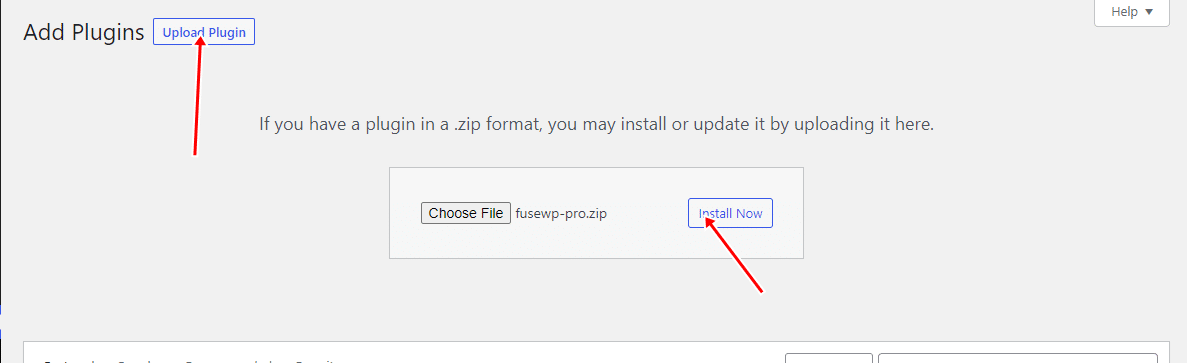
Then click Activate Plugin after the installation is complete.

With FuseWP installed and activated, your site is ready to sync users, leads, and membership data automatically with your CRM.
Choose Your CRM in FuseWP
Next, connect your CRM or email marketing software account with FuseWP. To do this, go to Settings > FuseWP and select the CRM you want to connect.
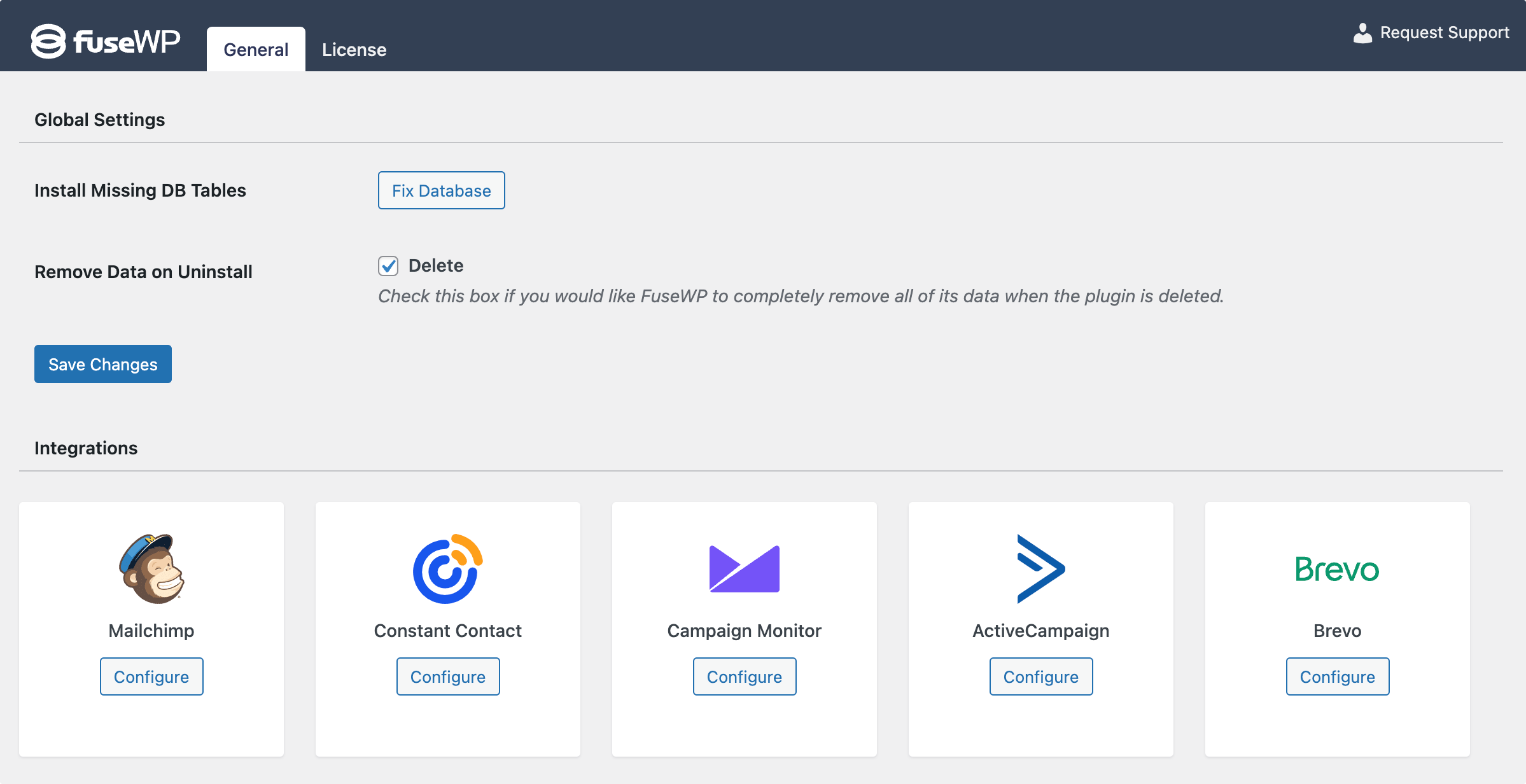
Once you pick your platform, you’ll be prompted to authorize the connection. This process varies by CRM. For example, Brevo will ask you to enter your API key.
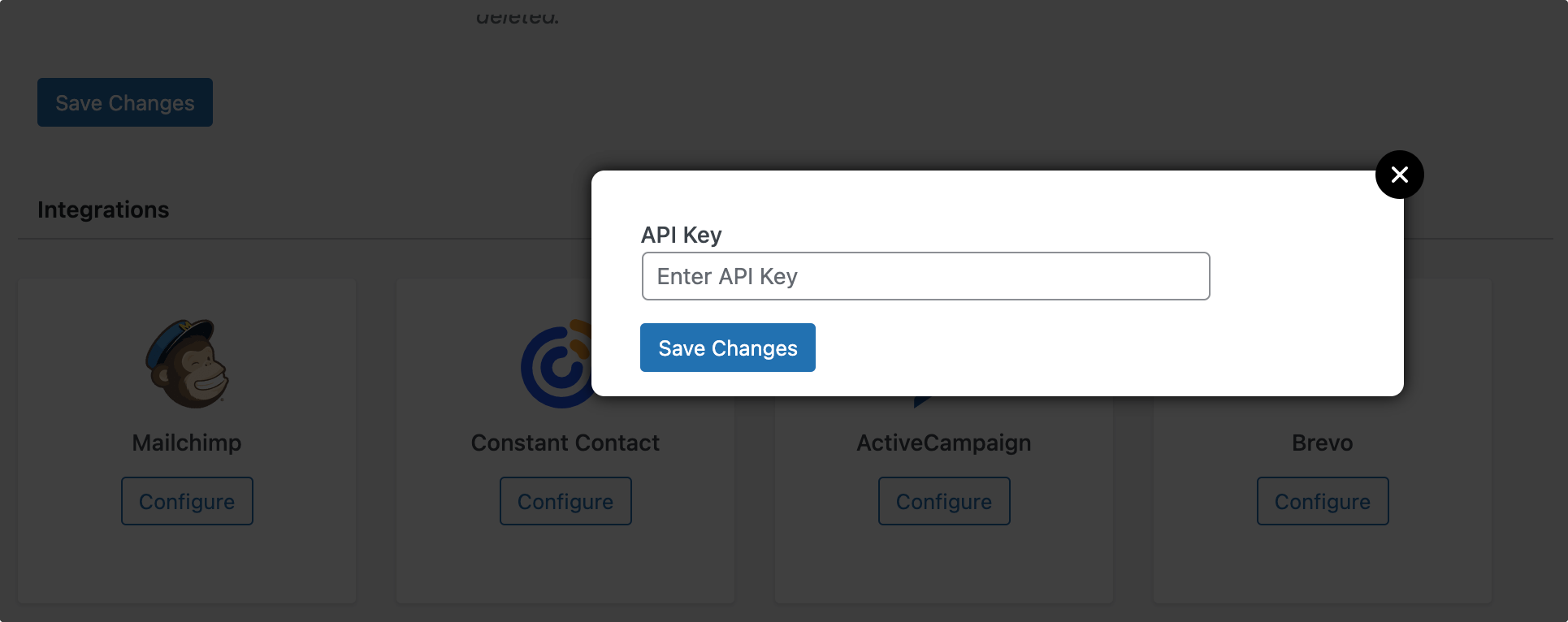
After entering your API key, click Save Changes. Once that’s done, you will have successfully connected Brevo to your WordPress site.
One unique feature of FuseWP is that it supports multiple CRM connections, allowing you to connect more than one CRM to your WordPress site.
Connect Your WordPress Plugins to Your CRM
Once your CRM is connected to FuseWP, the next step is to link the WordPress plugins you use to your CRM.
FuseWP supports a wide range of plugins, including WooCommerce, WooCommerce Memberships, WooCommerce Subscriptions, Easy Digital Downloads, MemberPress, WPForms, Gravity Forms, Ninja Forms, Forminator, Fluent Forms, Formidable Forms, Everest Forms, SureForms, WS Form, ProfilePress, Paid Memberships Pro, Restrict Content Pro, and popular LMS plugins like LearnDash, LifterLMS, Tutor LMS, Academy LMS, MasterStudy LMS, Sensei LMS, as well as community and affiliate plugins.
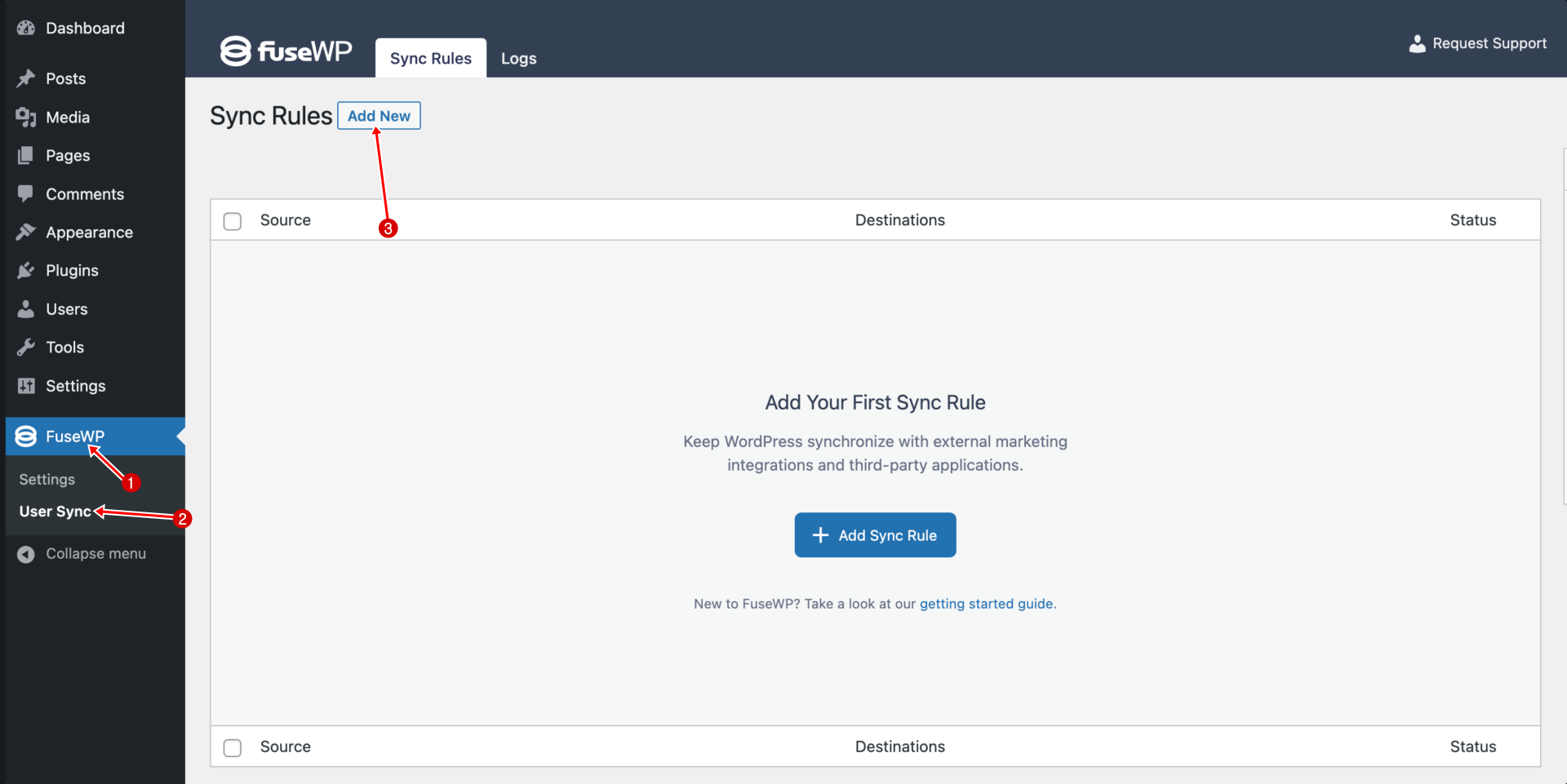
Let’s use WPForms as an example, though the steps are similar for all supported plugins. Go to FuseWP > User Sync and click Add New.
On the new sync page, select WPForms as the source plugin and choose the specific form whose submissions you want to sync to your CRM.
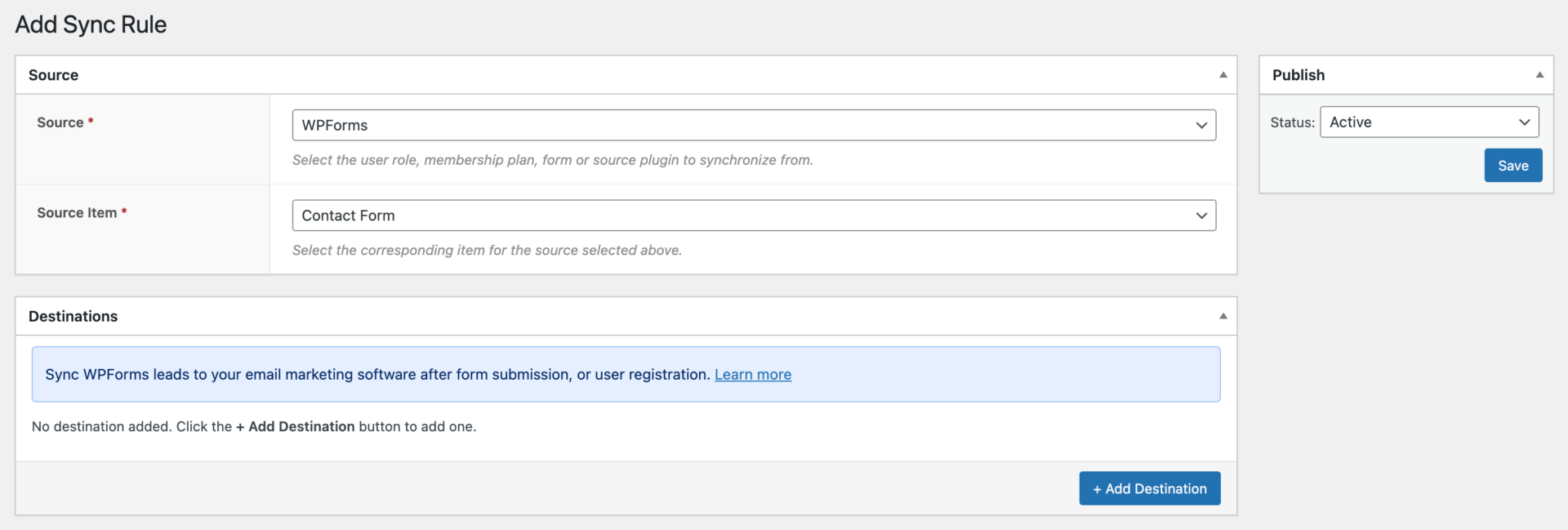
Next, click on Add Destinations.
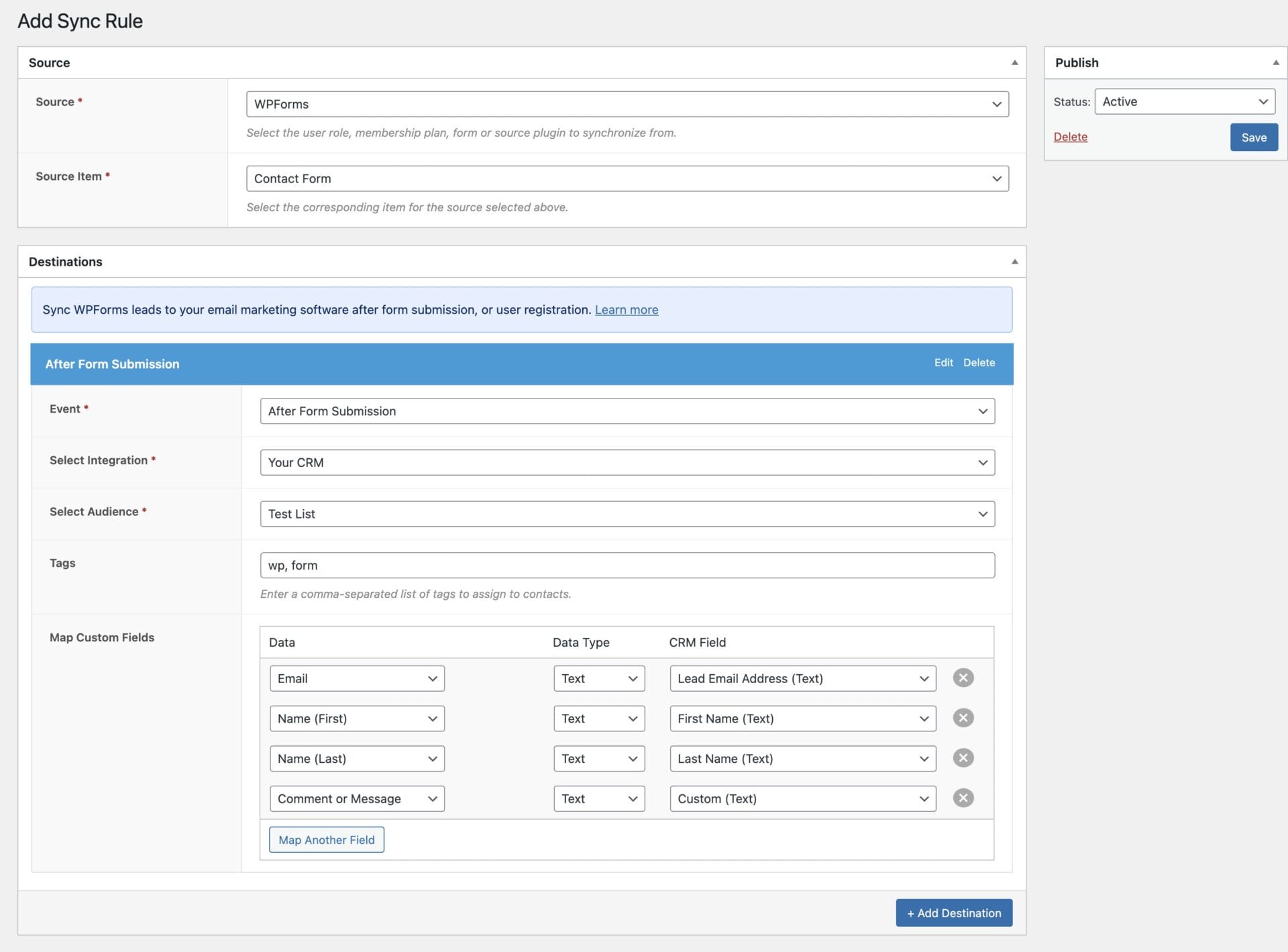
In this section, select the Event that will trigger the synchronization, choose the CRM you want to connect to, select the appropriate Audience, apply any Tags if needed, and map your custom fields. Once you have finished configuring the settings, click Save.
After the connection is set up, FuseWP will automatically sync users or leads to your selected CRM or email marketing platform whenever the chosen event occurs.
For example, if you configure a form submission event, anyone who submits that form will be added to your selected audience, and their information will be synced according to the field mappings you configured. Likewise, if you configure WordPress user registration, profile updates, membership changes, purchases, or other supported events, FuseWP will automatically keep your CRM data up to date in response to those actions.
WordPress CRM FAQs
When it comes to managing customer relationships directly from your WordPress site, questions often arise about setup, integrations, and plugin selection. Below, we answer the most common queries about WordPress CRM integrations, WordPress CRM software, and the best WordPress CRM plugins for marketers.
Q1. How do I choose the right WordPress CRM for my site?
When selecting WordPress CRM software, consider your marketing needs, the plugins you already use, and whether you require advanced automation, membership management, or ecommerce integrations. Then, read through this guide to quickly identify which plugin offers the capabilities you need.
Q2. Can I use a free CRM with WordPress?
Yes. Several providers, including HubSpot and Jetpack CRM, offer free versions that can later be expanded with premium features.
Q3. Does WooCommerce work with CRMs?
Absolutely. Many leading CRM systems integrate with WooCommerce and can use purchase history for segmentation and automation.
Q4. Are self‑hosted WordPress CRMs better than cloud CRM?
It depends on your priorities. Self‑hosted keeps data on your server and avoids per‑contact fees, while cloud CRM often offers deeper analytics, sales pipelines, and cross‑channel reporting.
Q5. What are WordPress CRM integrations?
WordPress CRM integrations connect your website with customer relationship management platforms so information flows automatically between them.
For example, when someone registers for an account, submits a contact form, purchases a product, or signs up for a membership, the integration can automatically send their information to your CRM. This eliminates manual data entry and helps keep your customer records up to date.
FuseWP makes it possible to create these integrations without writing code.
Q6: Can I connect multiple CRM platforms to WordPress?
Yes. Depending on the integration plugin you use, you can connect multiple CRM or email marketing platforms to a single WordPress website.
For example, FuseWP supports multiple CRM connections, allowing you to sync WordPress data to multiple platforms simultaneously if your workflow requires it.
Conclusion
Choosing the right CRM for your WordPress site doesn’t have to be complicated. Whether you’re looking for WordPress CRM software to manage contacts, automate marketing, or integrate with ecommerce and membership plugins, the options highlighted in this guide cover a range of needs and budgets.
From FluentCRM and HubSpot for marketers focused on automation, to FuseWP for integrating several WordPress plugins with email marketing and CRM platforms, to MailOptin for capturing leads and growing your email list through optin forms and automated email campaigns, and ProfilePress for membership-focused workflows, you now have a clear picture of the best WordPress CRM plugins available.
Start by testing the plugins highlighted here, exploring the free versions where available, and pick the solution that fits your workflow and business goals.